Skip to content

Intermittent fasting for iPhone and Apple Watch

Every hour you fast
counts

Do IF times your fast and shows which stage your body is likely in. Water, weight and movement live in the same app. Open it and you know what to do next. No sign-up needed.

  • No ads
  • No account needed
  • Data stays on your phone*
  • Face ID lock

* Except the AI coach and AI food check, which send data only when you tap to ask

Body stages while you fast
7
Plans from 12:12 to 23:1
12
Levels to climb
99
Ads, ever
0

Highlights

Everything you need while fasting
designed to stay out of the way

A timer ring
that shows where
your body is

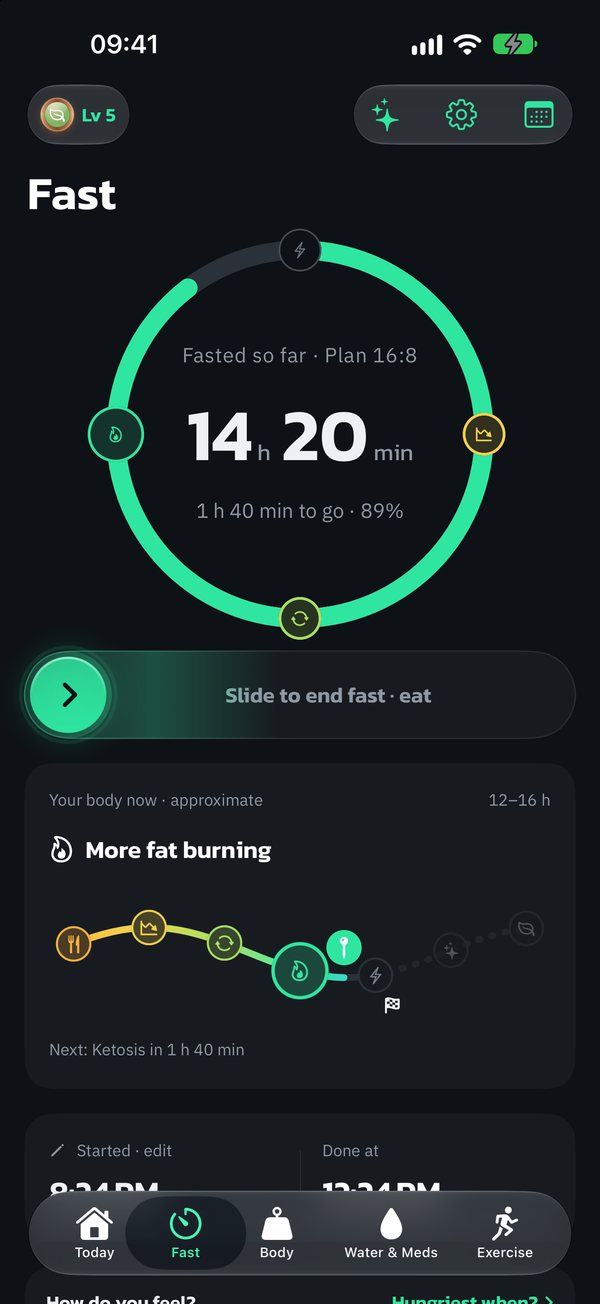
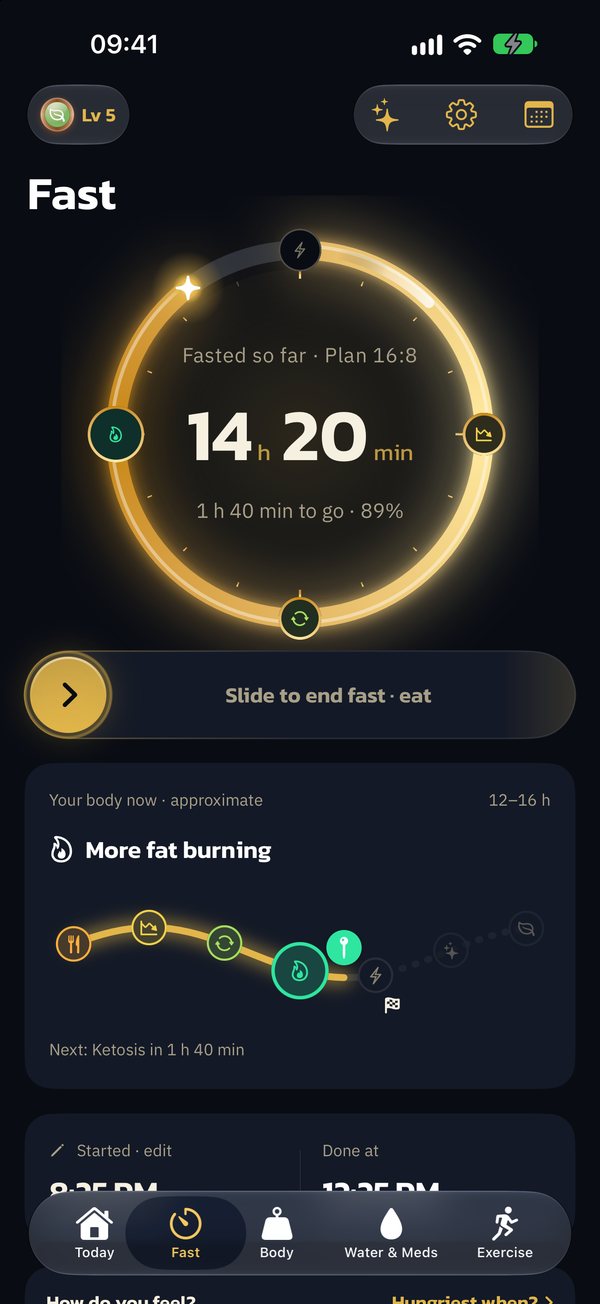
The ring changes color across 7 body stages. Slide to start or stop, so no accidental taps.

Plans 12:12 to 23:1 Lock Screen Dynamic Island Widgets
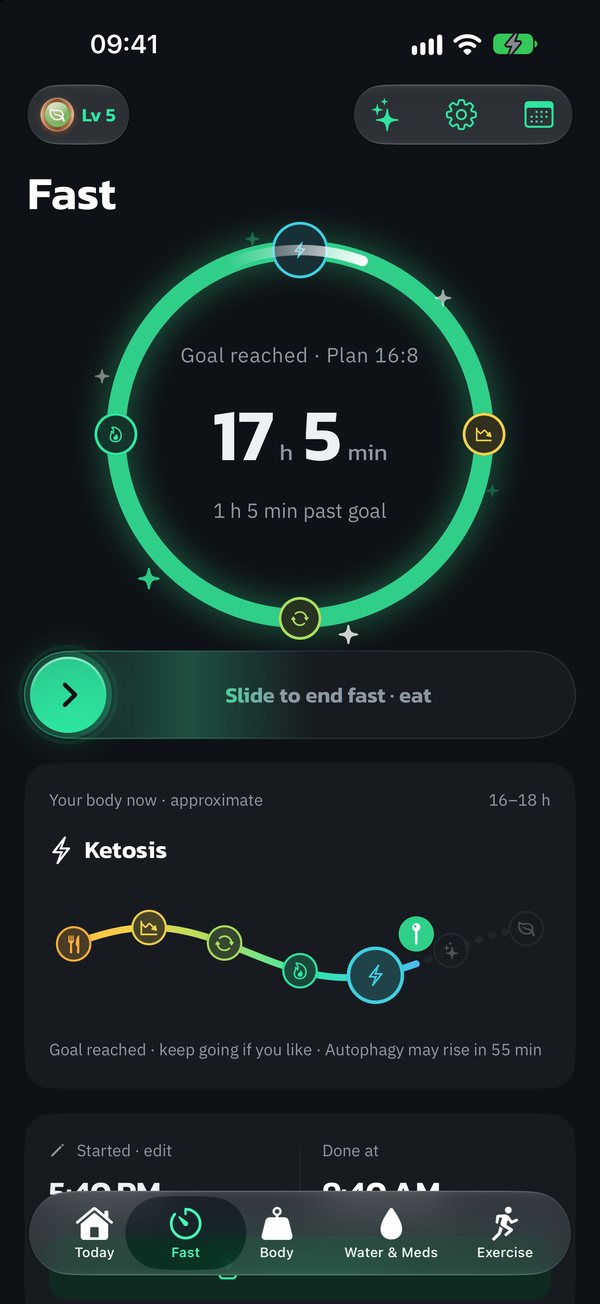
Fasting timer ring after reaching the goal, with body-stage icons around the ring

Start and stop
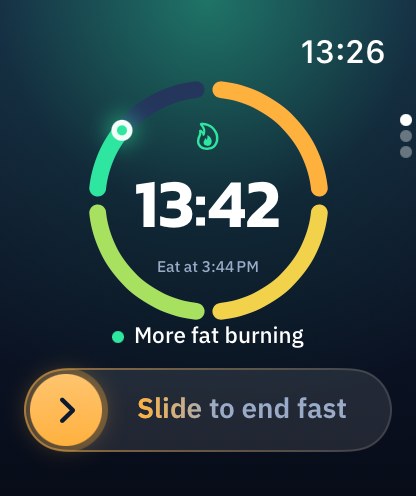
from your wrist

No need to grab your phone. The ring on your watch changes color with each body stage, just like on iPhone.

Do IF on Apple Watch
Silver

What to do right now

The Today screen gives you one clear nudge. Tap it and it's done.

Where your water should be

The bottle follows the time of day, so you see the gap without doing math.

Gold

A personal AI coach that knows you

The coach sees a summary of your fasting, water, weight and sleep. Snap a meal and the AI estimates calories and protein, then suggests what to eat next.

Your data stays with you

Stored on your phone, encrypted. Face ID lock, no ads.

A path to your goal

Shown as a likely range, never one promised date, and tracked for you.

While you fast

Know which stage
your body is likely in

The timer ring changes color across all 7 stages. Tap one to see what may be going on.

  1. 0h

    Digesting

    Your body is digesting your last meal. Blood sugar is still up.

  2. 4h

    Blood sugar drops

    Insulin starts to fall and stored energy comes into play.

  3. 8h

    Using stored energy

    Glycogen stored in your liver becomes the main fuel.

  4. 12h

    Burning more fat

    Your body tends to lean more on fat for energy.

  5. 16h

    Ketosis

    Your liver may start making ketones. Some people feel less hungry.

  6. 18h

    Autophagy may rise

    Longer fasts may help clear out old cells.

  7. 24h

    Autophagy may rise further

    Drink enough water. Stop right away if you feel unwell.

  8. Times are rough estimates and vary from person to person, depending on your last meal, sleep and activity.

Every feature, in depth

Thoughtful in every detail
simple with every tap

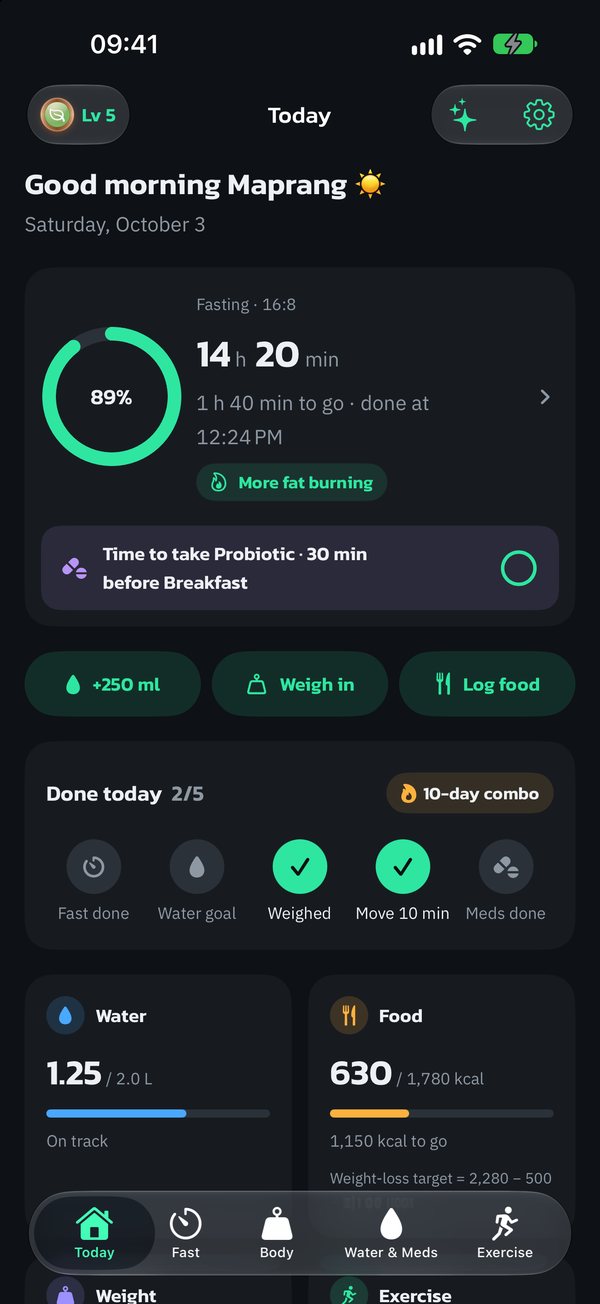
Today

Your whole day
on one screen

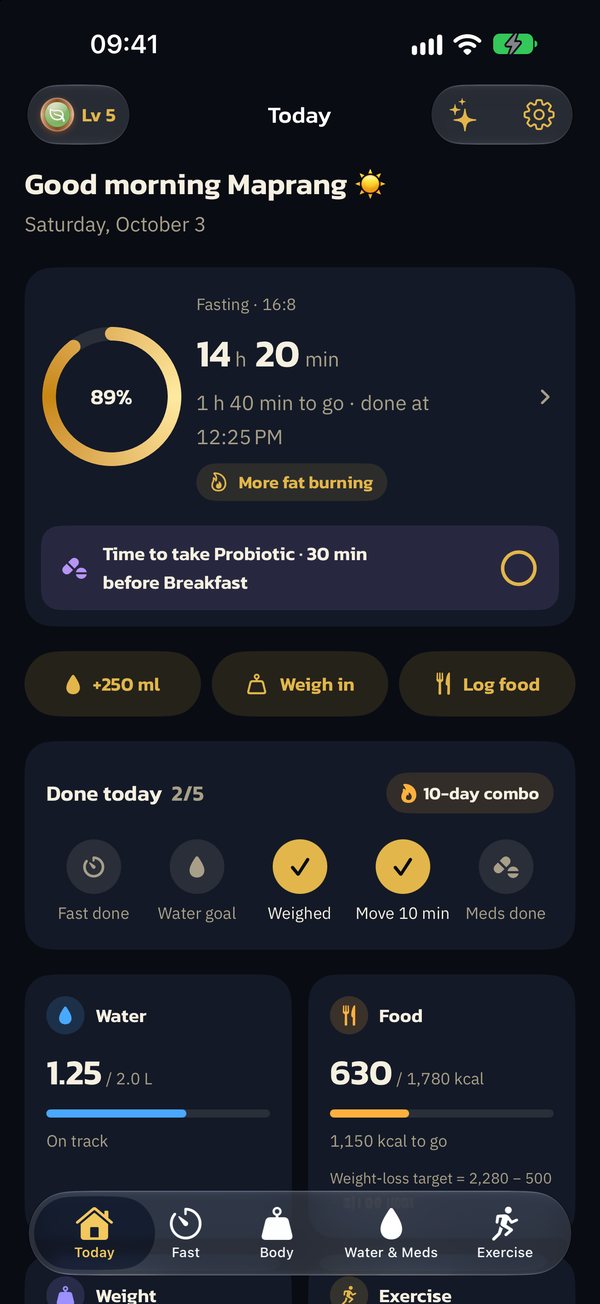
Open the app and get one clear nudge for right now, like "time to start your fast" or "you're behind on water". No digging through tabs.

  • Fasting, water, weight, workouts and your streak at a glance
  • Add water, weigh in or log food in one tap
  • A "Done today" checklist: fast, water, weigh-in, 10 minutes of movement and meds
  • A weekly summary of what improved and what to try next
The Do IF Today screen: fasting, water, food and what's done today

IF timer

Slide to start,
so no accidental taps

Pick your plan and let the app keep count. Your fast shows up wherever you look on your iPhone.

  • Plans from 12:12 up to 23:1 (OMAD), any hour in between
  • Your fast on the Lock Screen, Dynamic Island and widgets
  • A little celebration when you finish, plus a reminder when it's time
  • Forgot to stop? Tell it when you started eating and your log stays accurate
  • Stopped by mistake? Keep going from your original start within 15 minutes
The IF timer with its ring and slider

Water & meds

Keep up with water,
no math needed

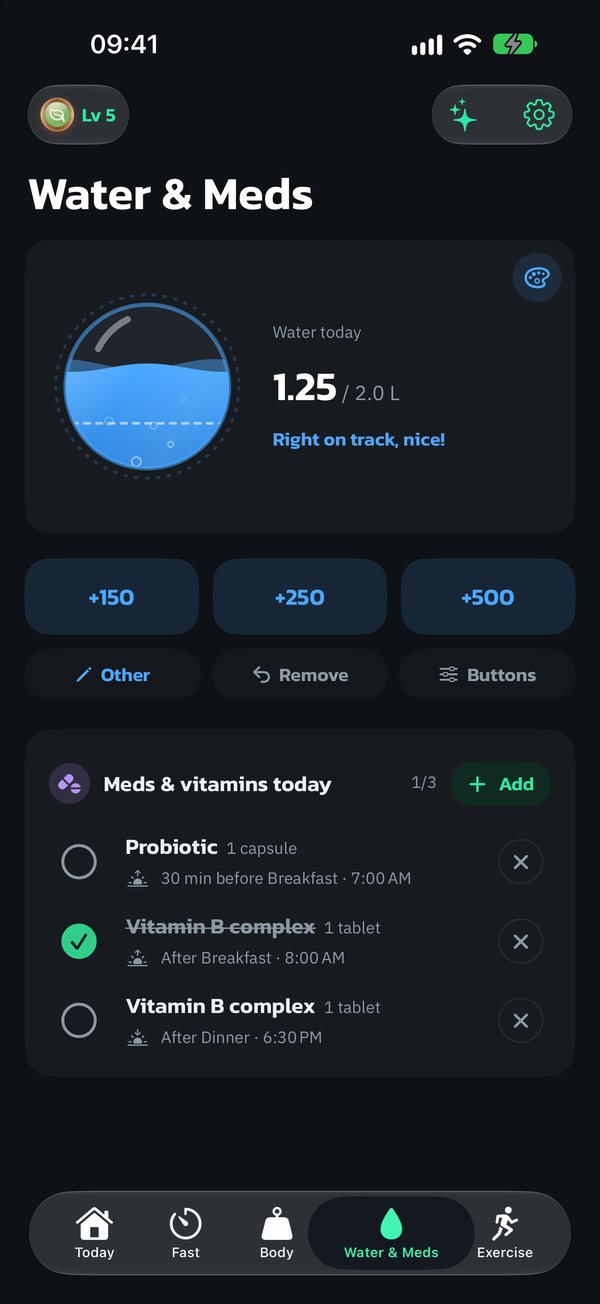
The bottle shows where you should be by now for the time of day, so you see exactly how far behind you are.

  • +150, +250, +500 ml buttons, or type your own
  • Water reminders that skip a round when you're already on track
  • A gentle heads-up if you drink too much too fast
  • Med and vitamin reminders that read like a pharmacy label, before or after meals, free and unlimited
  • Pick your bottle: a lemon iced glass, a fishbowl, a golden moon and more (3 with Silver, 8 more with Gold)
Water and meds: the bottle and where your water should be by now

Body & weight

An honest path
to your goal

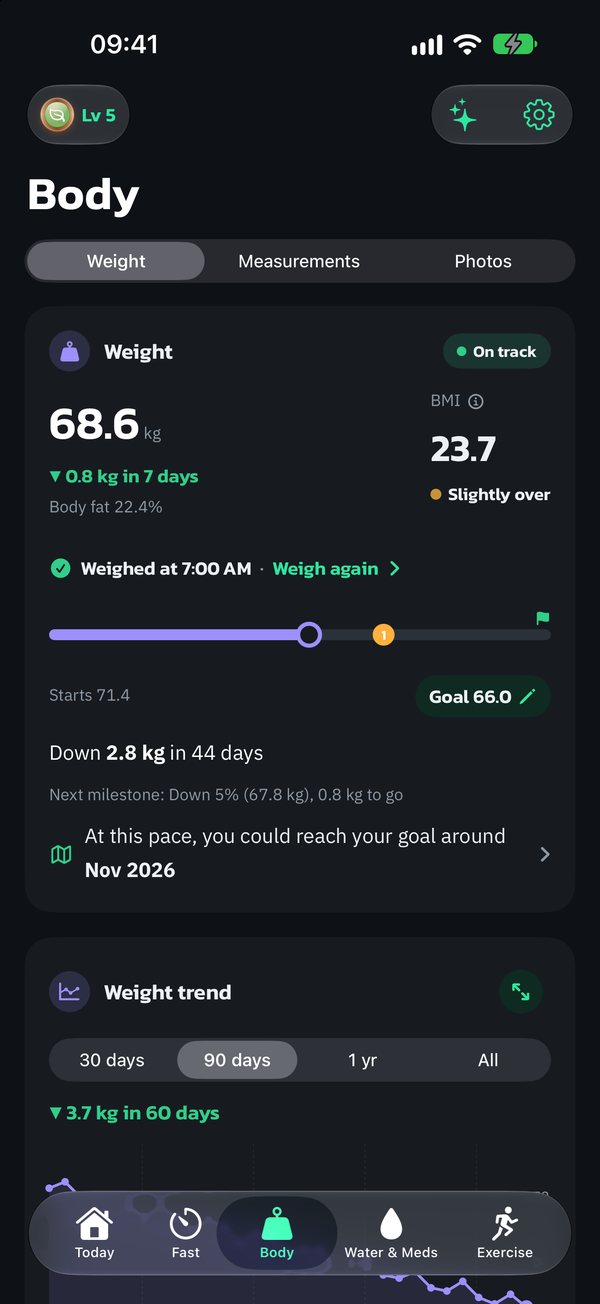
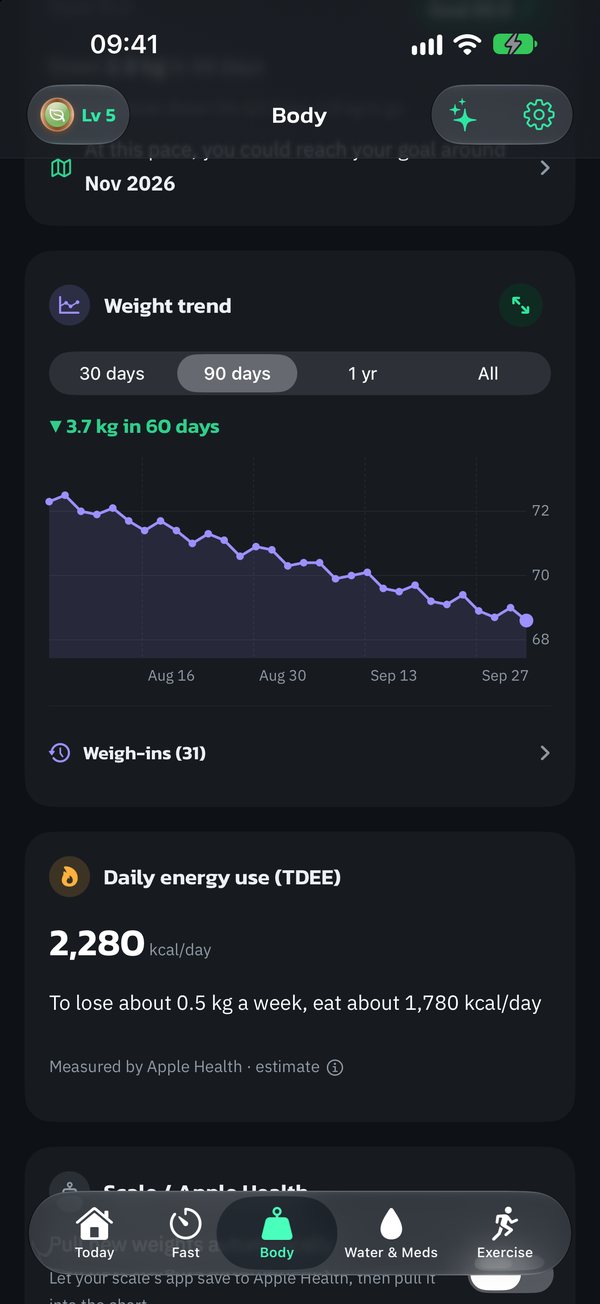
Set a goal and the app estimates when you'll likely get there, as a range, not a single promised date. Then it keeps an eye on whether you're on track.

  • BMI with Asian cut-offs, plus trend charts
  • Daily energy use and calorie target, always with a note on how it's worked out
  • Waist, hips, chest, arms and legs, with a waist-to-height check (Silver)
  • Losing too fast? The app reminds you to eat enough
The Body tab: weight, BMI and progress from start to goal
Weight trend chart and the path to your goal

Period log Silver

Tap "Started" once.
The app tracks your cycle.

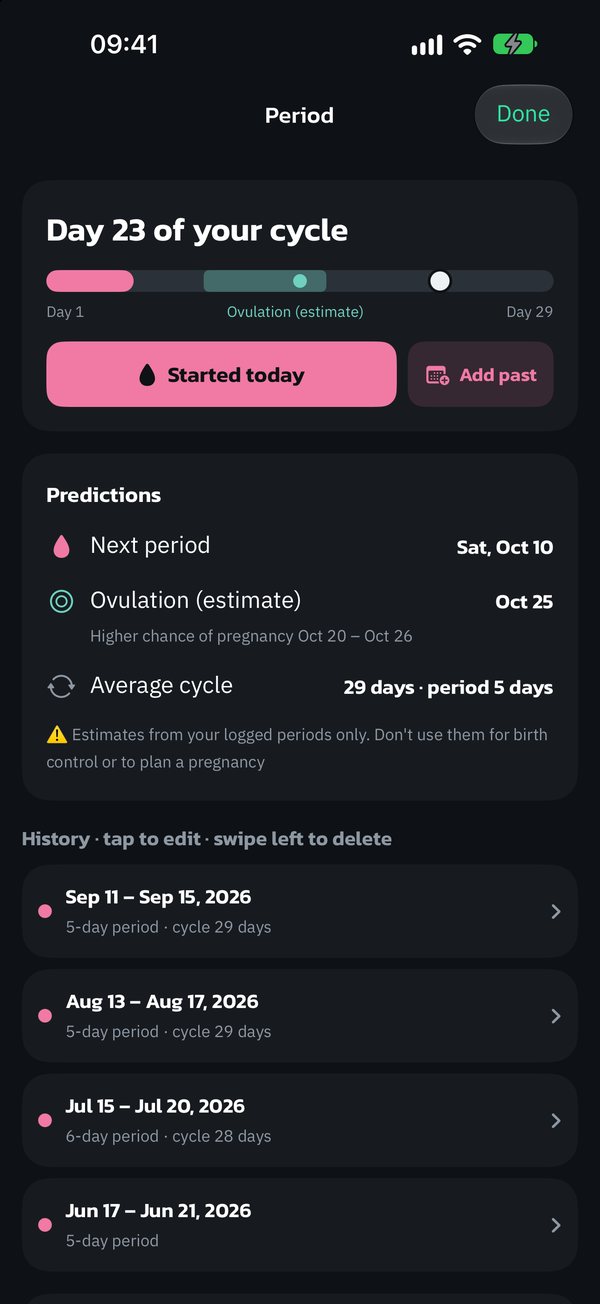
Log it on the Today screen. The app predicts your next period, reminds you before it and tells you when you may feel hungrier.

  • Tap "Started" and "Ended", add past periods and see every cycle
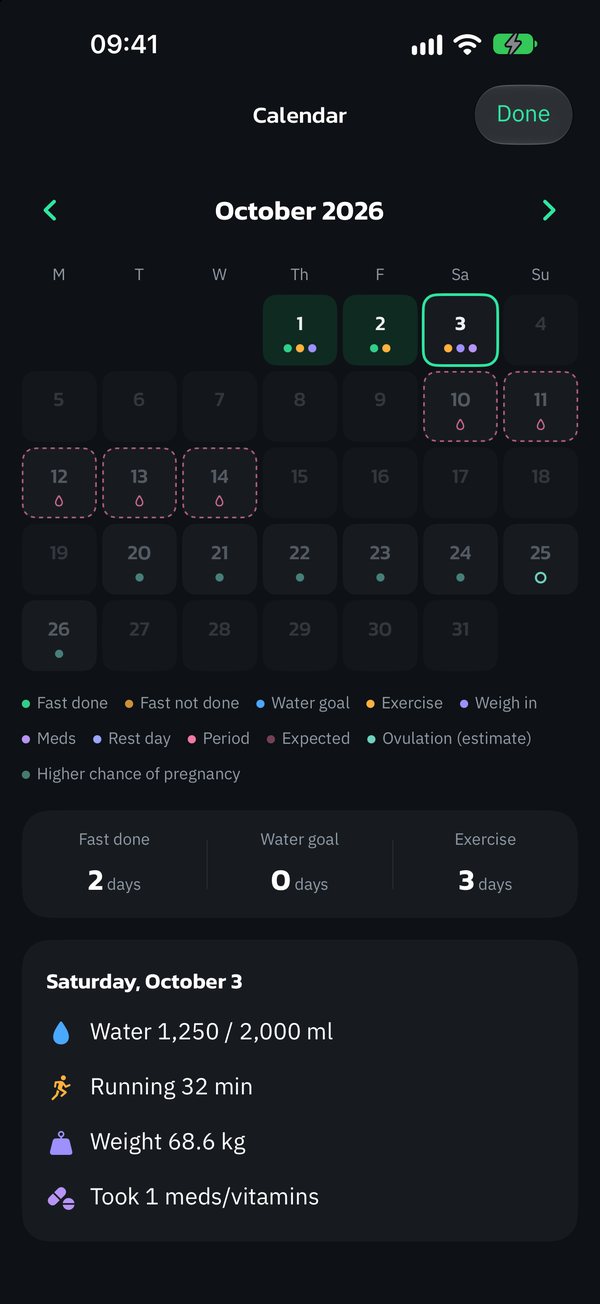
  • Next-period prediction, a reminder 1–5 days ahead, calendar and symptoms
  • Near your period, the Fast tab suggests a shorter plan, and the weight chart shades your period days so you can see the bump is usually water
  • Stays on your phone, and Lock Screen reminders use neutral wording. The AI coach only gets a short summary when you ask (Gold)

Ovulation days are estimates only. Never use them for birth control.

The period log
Period calendar with predicted cycles

Workouts

Hit 150 active
minutes a week

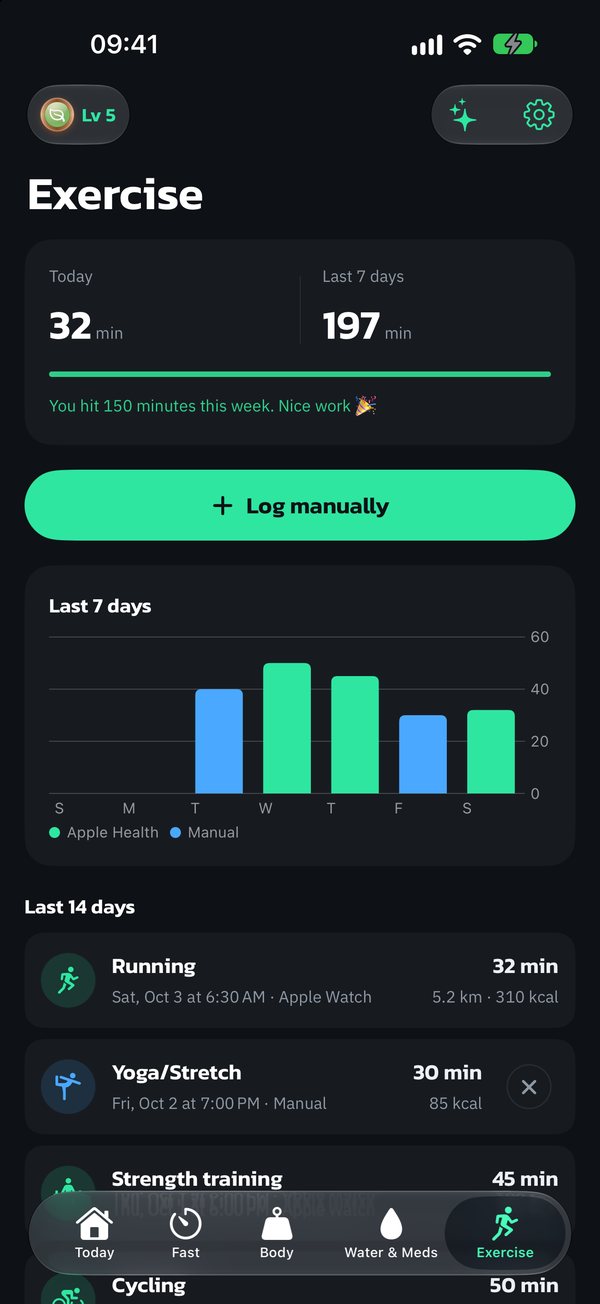
The goal the World Health Organization recommends. Log workouts yourself or pull them from Apple Health.

  • 9 workout types to log yourself, with estimated calories
  • From Apple Watch or any watch that syncs to Apple Health (Silver)
  • Overlapping workouts don't count the same minutes twice
Workouts, with a goal of 150 minutes a week

Apple Watch Silver

Your fast,
on your wrist

No need to grab your phone. The ring on your watch changes color with each body stage, just like on iPhone.

  • Slide to start or stop, same as on iPhone
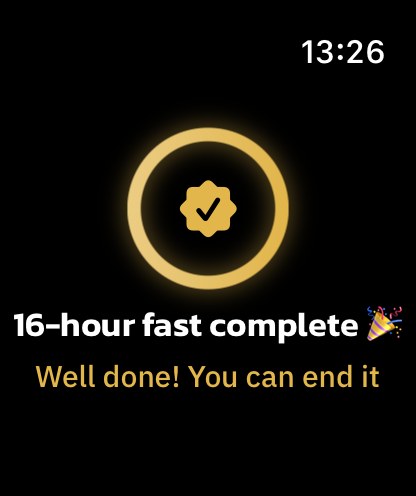
  • A full-screen alert on your watch the moment you finish a fast
  • Your watch matches the theme you pick on iPhone, like gold or silver
  • Add water from your watch, and undo within 8 seconds
  • Complications for your watch face, from fasting hours to a fasting path through all 7 body stages
Do IF on Apple Watch: the fasting ring and slide-to-stop Full-screen fast complete alert on Apple Watch in the gold theme

AI coach Gold

A personal coach,
whenever you ask

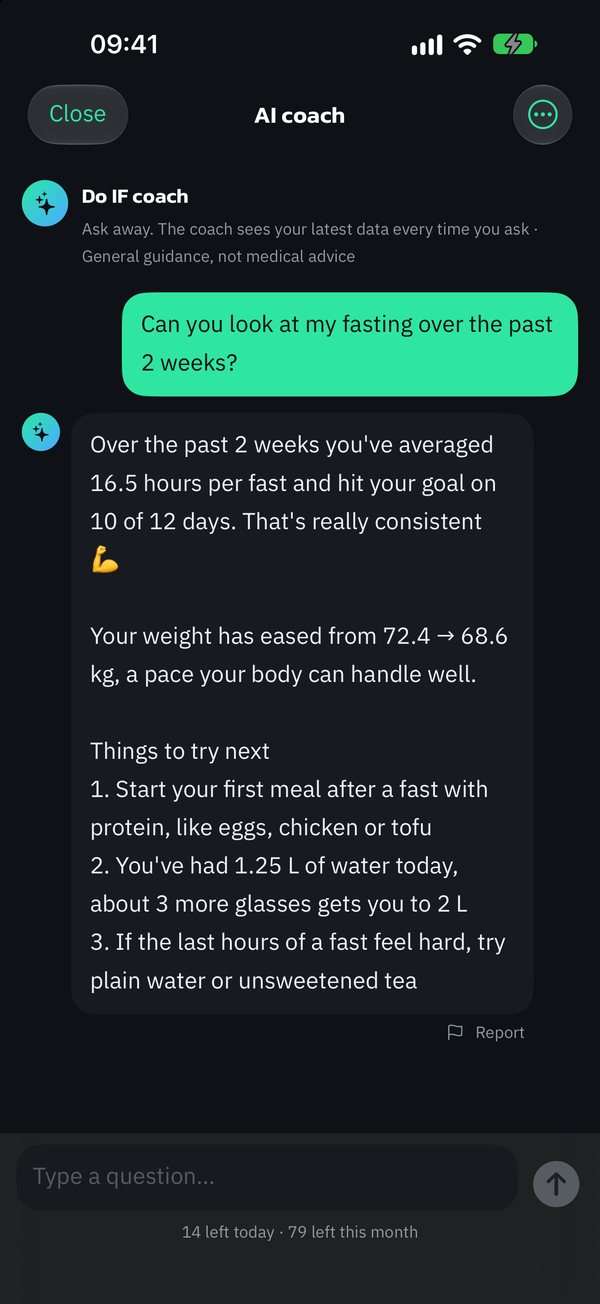
The coach sees a summary of your fasting, water, weight and sleep, so the answers are about you, not generic advice.

  • Up to 80 messages a month (15 a day max), plus a weekly review
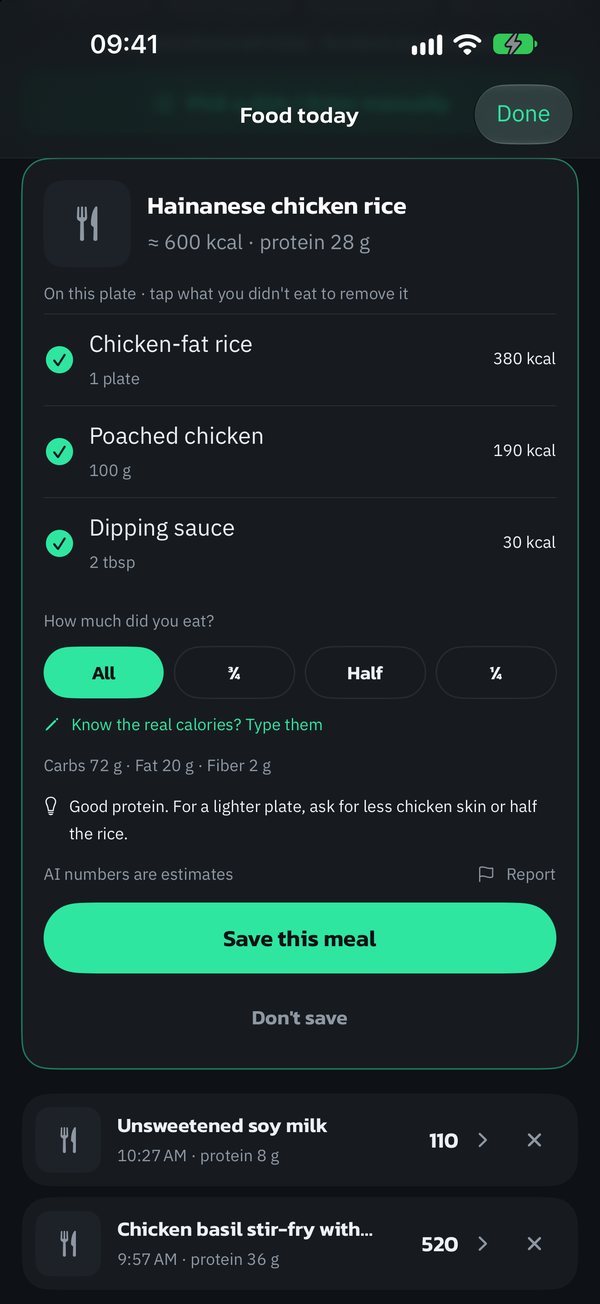
  • Snap a meal, label or menu, or just type it, and the AI estimates calories and protein
  • What to eat next, based on the calories you have left (AI food check shares 90 uses a month)
Your data summary or food photo goes to Anthropic's Claude only when you tap to ask, after you agree separately. Our server doesn't store your messages or photos.
18+ only. Answers are not medical advice.
Chatting with the AI coach
The AI estimating calories from a meal

Midnight Gold Gold

A luxe look,
every time you open it

Navy and gold across the app, Lock Screen, widgets and Apple Watch. The fasting ring glows, with a slow light running along it.

  • 4 gold app icons: Gold, Black Gold, Platinum and Rose Gold
  • A shower of gold when you finish a fast
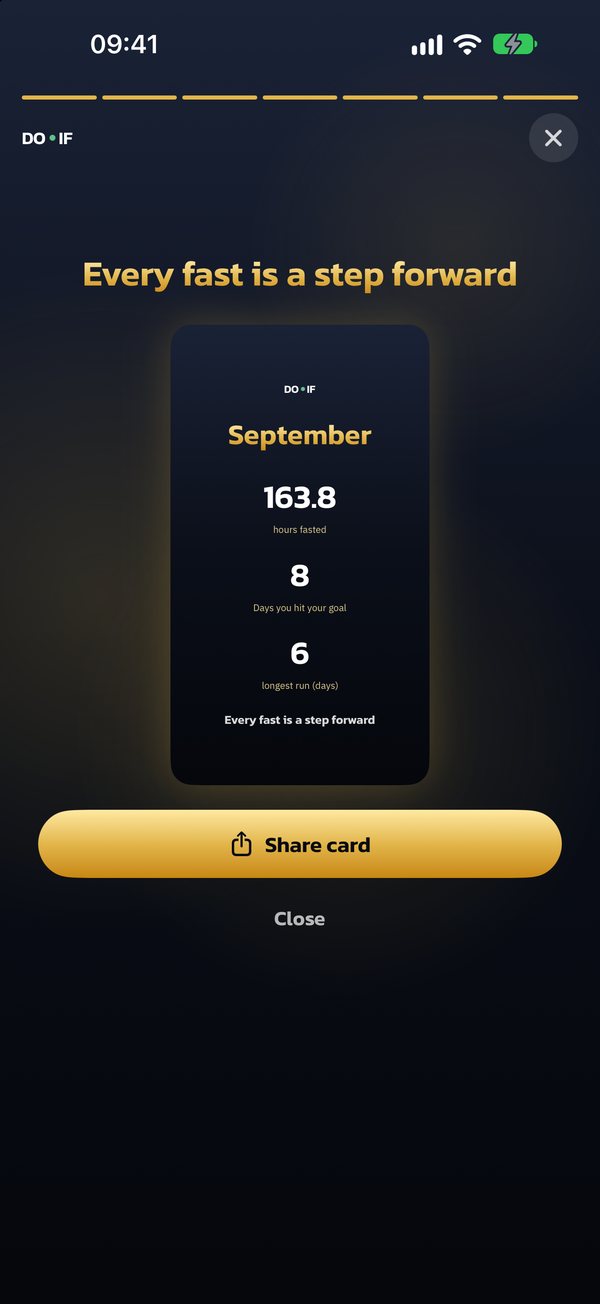
  • Monthly and yearly recap stories with share cards that never include your weight
  • Turn on Reduce Motion or Low Power Mode and the glow stays still, easy on the battery

Silver comes with the Moonlight Silver theme too

The Midnight Gold theme on the timer
Full-screen monthly recap story with a share card
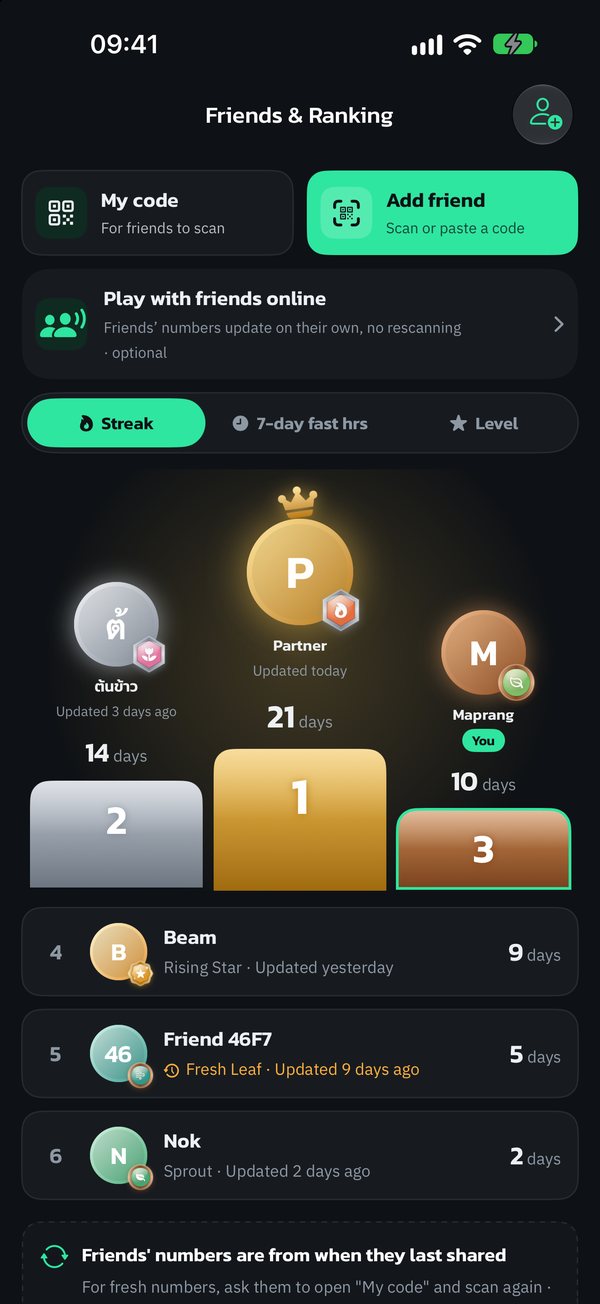
Friends ranked on a podium
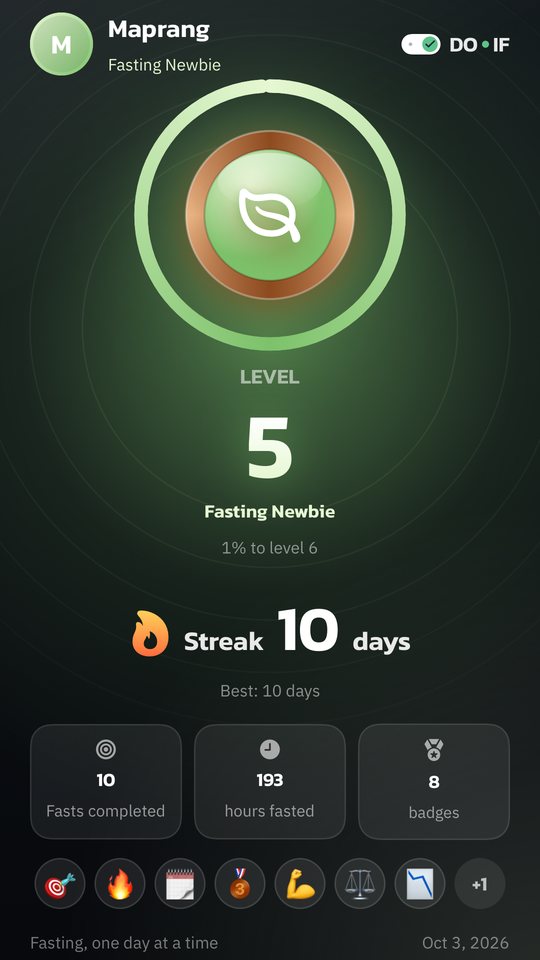
A story-size share card

Friends & sharing

Fasting alone is lonely.
Bring your friends.

It's easier to keep going when someone's cheering you on. Add friends by QR code or play online.

  • A podium ranked by streak, fasting hours this week or level
  • 7-day duels: who fasts more? Count total hours or completed fasts
  • Add friends by QR code or send an invite code on LINE (online play uses Sign in with Apple or Google)
  • Story-size cards for Instagram, Facebook or LINE. 9 backgrounds, all free, and you choose whether to show your photo and name
  • Share your weekly summary on any plan (monthly and yearly recap stories are part of Gold)

Friends see progress numbers only. Never your weight, body data or anything from Apple Health. Your name stays hidden until you turn it on. Share cards never include weight or waist size.

And more

Small touches
that keep you going

Levels, medals and challenges+

99 levels. Earn XP for fasting, water and weigh-ins. Your medal changes every 10 levels, and at level 99 you become a Legend and can start again.

Rest days+

Miss one day a week and your streak stays alive. With Silver you can pick days off and set a different plan for each day.

Consistency calendar+

Every finished fast on one calendar, so you can see how the month went.

Festival themes+

New Year, Lunar New Year and Songkran looks, with special app icons.

Hunger log+

One tap while fasting, free. Silver shows which hours of your fast you get hungriest.

Know yourself+

See whether sleep, water or start time helps you finish more fasts. Worked out on your phone (Silver).

Before & after+

Progress photos stay on your phone. Never sent to our server, never sent to AI (Silver).

Weekly summary+

What improved and what to try next. Worked out on your phone, on any plan.

Your bottle, your way+

Set buttons for the bottles you really use, log a whole bottle in one tap, and pick how your bottle looks (Silver).

Control Center, Action button and Siri+

Start a fast or add water without opening the app (Silver).

Special widget designs+

A 24-hour dial, a body-stage ring and a fasting path, 3 designs in all (Silver).

Export my data+

Take everything out as CSV files on any plan. It's your data.

Drinking too much, too fast+

The app tells you to slow down, and suggests electrolytes if you're fasting. On every plan.

Under 18+

Plans go up to 16:8 only, and the AI coach is for ages 18 and up.

Losing weight too fast+

The app reminds you to eat enough and shows your goal as a range, never pushing you to lose faster.

Delete everything with one button+

Settings → Privacy & data → Delete all app data. If you have an account, it asks whether to delete that too.

Privacy

Your health data
stays with you

The app works fully without sending your health data anywhere. No ads, and we don't make money from anyone's data.

Read the full privacy policy

No account needed

Download and go. An account is only for online friends, or the AI coach and AI food check.

Stored on your phone, encrypted

Your data lives on your iPhone and can't be read while it's locked. Moving phones? It comes along with iCloud Backup.

Face ID lock

On from the start, and the screen is hidden in the app switcher so nobody sees your weight.

No ads, no cross-app tracking

No third-party analytics or ad SDKs. Delete everything with one button.

The exception: AI coach and AI food check (Gold)

A summary of your data or your food photo goes to Anthropic's Claude only when you tap to ask, after you agree separately. Our server doesn't store your messages or photos, and we ask again if the terms change.

Plans

Track for free, forever
upgrade for deeper insight

Bronze covers all the everyday basics. No ads, no time limit. The deeper insights live in Silver and Gold.

Bronze

Free

No ads, ever

  • IF timer with all 7 body stages
  • Log water, weight, food and workouts
  • Hunger log while fasting
  • Water and med/vitamin reminders, before or after meals
  • 30-day charts and a weekly summary
  • 99 levels, medals and challenges
  • Invite friends to cheer each other on
  • Your fast on the Lock Screen and widgets
  • Face ID lock

Silver

14-day free trial

฿99/ month

or ฿990 a year (2 months free)

Everything in Bronze, plus

  • A different plan for each day, and pick your fasting days
  • Automatic sync from Apple Health
  • Start and stop your fast from Apple Watch
  • Your full history, with no time limit
  • Progress photos: compare any before and after
  • Body measurements: waist, hips, chest, arms and legs, with charts
  • See which hours of your fast you get hungriest
  • Start a fast or add water from Control Center, the Action button and Siri
  • Period log: next-period prediction, reminder, calendar and ovulation estimate (not for birth control)
  • A calorie target based on what you actually burn
  • Your own water buttons and 3 more bottle styles
  • Know yourself: see what helps you finish more fasts
  • 3 special widget designs and the Moonlight Silver theme

Gold

฿179/ month

or ฿1,790 a year (2 months free)

Everything in Silver, plus

  • A personal AI coach, up to 80 messages a month (15 a day max)
  • A weekly review from your coach: what went well and what to adjust
  • Snap a meal, label or menu and the AI estimates calories
  • Type what you ate and the AI works out the calories
  • What to eat next, based on the calories you have left
  • The Midnight Gold theme across the app, Lock Screen and widgets
  • Monthly and yearly recap stories
  • 4 gold app icons and a golden finish celebration
  • 8 special bottle styles, like a fishbowl and a golden moon

AI food check (photo, text, next meal) shares 90 uses a month · AI needs you to be 18+, signed in, and to agree first · AI answers are general guidance, not medical advice

Silver Lifetime

Early Bird · first 300 only

Pay once and keep everything in Silver forever. No renewals. Want the AI coach? Add Gold anytime. Leave Gold and you still have Silver.

฿1,290฿1,990

Early Bird price for the first 30 days after launch · then ฿1,990

Paid through the App Store, cancel anytime in your iPhone's Settings · The free trial is for Silver only, for people who haven't tried it before. If you don't cancel before it ends, billing starts automatically · Silver Lifetime is a one-time payment and doesn't renew · Prices shown are for Thailand and may differ in your country; the price in the app is the one that applies.

Before you start fasting

Intermittent fasting is safe for most healthy adults, but talk to a doctor first if you:

  • Have diabetes, especially if you use insulin or glucose-lowering meds
  • Are pregnant or breastfeeding
  • Have had an eating disorder
  • Have low blood pressure, or take blood pressure meds or diuretics
  • Have kidney or heart disease, or a condition that needs meds with food
  • Under 18

Stop right away if you feel unwell. If you're very dizzy, have a racing heart, feel faint or confused, drink water, eat something, and see a doctor if it doesn't get better.

Do IF helps you track and get reminders. It isn't medical advice and isn't meant to diagnose or treat any condition.

Help

Common questions

Is it free? Do I need to sign up?+

Yes, it's free, and no account is needed. The timer, water, weight, hunger log, workouts and med reminders are all in Bronze, with no ads. Insights like charts beyond 30 days, body measurements, before-and-after photos and Apple Health sync are in Silver.

What devices does it work on?+

iPhone with iOS 18 or later. The Apple Watch app is part of Silver. There's no Android version yet.

Will I lose my data on a new phone?+

Your data lives only on your phone. It comes back if you restore your new phone from iCloud Backup or a computer backup. Apple Health data follows your Apple ID. You can also save a copy first with Settings → Privacy & data → Export my data.

Apple Watch or other watch data not showing+

Open Settings → Health → Data Access & Devices → Do IF and turn everything on. For other brands, turn on Apple Health syncing in that watch's own app first (reading from Apple Health is part of Silver).

Cancel or restore your plan+

Cancel in your iPhone's Settings → your name → Subscriptions. On a new phone, open the app and go to Settings → Restore purchases.

Where is my period log kept?+

On your phone. Never stored on our server, never synced to iCloud or put in your iPhone Calendar, never on share cards. It's included in your iPhone backup if iCloud Backup is on. If you have Gold and ask the AI coach, the app sends a short period summary too, but never ovulation days. Lock Screen reminders use neutral wording, so anyone glancing at your screen won't know what it's about. Ovulation days are estimates from your logged periods and must not be used for birth control.

Delete my data or account+

In the app, go to Settings → Privacy & data → Delete all app data. If you have an account, it asks whether to delete your online account too. This can't be undone.

Contact us

support@doiflife.com

We usually reply within 2–3 business days.

Start your first fast
with Do IF

Timer, water, weight and movement, all in one place. No ads, your data stays on your phone, and it's free from day one.

Coming soon to the App Store

Coming soon to the App Store.